
1. Executive Summary
ATP360 is Rimo3's autonomous testing platform: AI agents that validate web applications end to end — generating test cases from your documentation, executing them on dedicated workers, and recording pass/fail evidence for every step. This brief describes how the solution is built, how it is deployed, and how it communicates, component by component, so your security and architecture teams can evaluate it on specifics rather than claims.
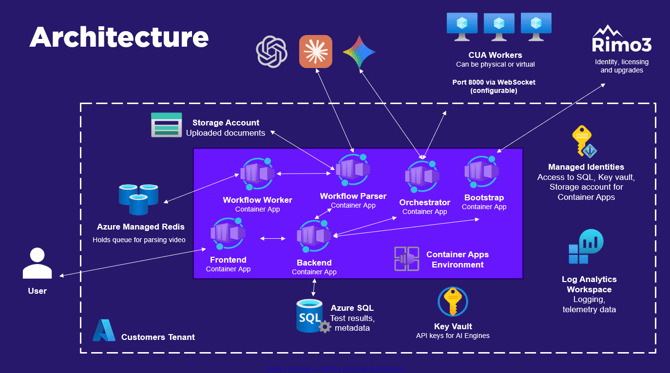
Three design decisions carry most of the security story. First, the entire control plane runs as a small, enumerable set of versioned container images inside an Azure Container Apps Environment, and every Azure data-plane dependency is reached with Managed Identity — no connection strings or access keys live in application configuration. Second, execution happens on CUA (computer-using agent) workers inside your tenant, and those workers connect outbound to the platform; nothing initiates a connection into your environment. Third, every credential a test needs is a named, write-only secret in Azure Key Vault, referenced by alias inside test steps — the plaintext value never appears in a test case.
ATP360 is available in two deployment models: as a PaaS solution deployed from the Azure Marketplace as a Managed Application into your own Azure tenant, and (coming soon) as a SaaS solution hosted in Rimo3's Azure tenant. Section 4 covers both in detail.
2. Platform Overview
ATP360 is organised as three specialised layers, each independently assignable to an AI engine and model to balance accuracy and cost:
- Parser. Turns structured documents, screen-recording videos, or plain prompts into executable test cases — steps plus pass/fail criteria — with AI-assisted parsing.
- Orchestrator. The reasoning engine. It observes, plans, and adapts in real time, guiding execution step by step, streaming a live view of the run, and issuing an explicit abort if an agent becomes stuck.
- Execution — CUA Workers. Computer-using agents run the test steps against the target application on dedicated physical or virtual workers and deliver step-level pass/fail proof.
The operating model is Define, Govern, Validate: scope the outcome, keep critical decisions in human hands, and deploy on evidence rather than assumption. Generated test steps are reviewed and confirmed by a person before execution, and results are reviewed before they are accepted.
The AI engines themselves are public LLMs: ATP360 integrates with Google Gemini, OpenAI's GPT models, and Anthropic's Claude Opus and Sonnet models. Access to these engines is controlled via API keys held in Key Vault.
3. Architecture and Containers
The control plane runs as container apps inside a single Azure Container Apps Environment, alongside the Azure data services they depend on. Execution capacity — the CUA workers — sits in the customer tenant, dedicated to testing.
|
Component |
Role |
|---|---|
|
Frontend (container app) |
User console — test authoring, live testing view, test results, reports, settings |
|
Backend (container app) |
Application APIs, persistence, secret and settings management |
|
Orchestrator (container app) |
Reasoning engine; plans, guides, and monitors every run; termination point for worker connections |
|
Workflow Parser (container app) |
Converts documents, video, and prompts into test cases |
|
Workflow Worker (container app) |
Executes parsing and processing workloads |
|
Bootstrap (container app) |
Deploys and upgrades the platform: pulls container images, writes secrets to Key Vault, checks the channel manifest for updates |
|
Azure Key Vault |
AI engine API keys and stored test secrets; accessed via Managed Identity |
|
Azure SQL |
Test results and metadata |
|
Storage Account |
Uploaded source documents |
|
Azure Managed Redis |
Queue for video parsing |
|
Log Analytics Workspace |
Logging and telemetry |
|
CUA Workers (customer tenant) |
Physical or virtual machines, dedicated to testing, that execute test steps |
Versioning and updates
Everything ships as versioned container images — Frontend, Backend, Orchestrator, Workflow Parser, Worker, and Bootstrap — released together as a single stream under one platform version, so components are never mismatched. The console shows the platform version and the version of every running image, pending updates are visible with release notes, and minor patches and container updates can apply automatically during off-peak hours. What is running is always auditable.
Updates are deployed automatically when made available by default, but auto-updates can be turned off and updates deployed manually from the UI:
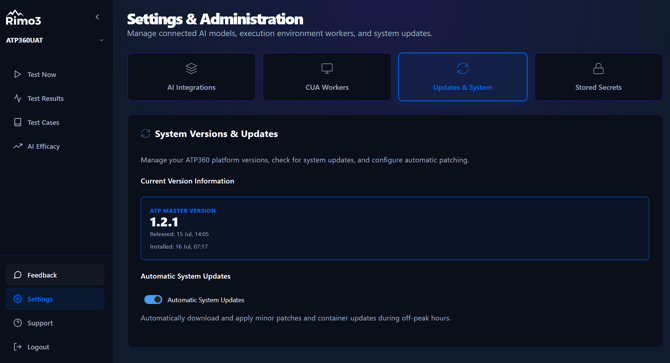
Note: if changes are made directly to resources in Azure, they will not be persisted on upgrade at this stage.
4. Deployment Models and Prerequisites
ATP360 is offered in two deployment models:
- PaaS (available now). Deployed from our Azure Marketplace Offering as a Managed Application into your own Azure subscription. All platform resources run inside your tenant; Rimo3 administers upgrades through the Managed Application. This is the model detailed in the remainder of this section.
- SaaS (coming soon). Hosted in Rimo3's Azure tenant, with the same architecture and the CUA workers remaining in your environment.
As SaaS is coming soon, the below documentation is in the context of a PaaS deployment
Deployment prerequisites
You will need to be logged into Azure with an account holding the Owner role for the subscription you plan to deploy ATP360 into, this is because the Resource Group that the resources themselved are deployed into must be created at the point the Marketplace Offering is deployed and cannot be done ahead of time. This is an Azure marketplace restriction we have no control over.
Before deploying the Azure Marketplace Offering into your Azure subscription, check that the following Resource Providers are registered for the subscription you plan to deploy into:
- Microsoft.App
- Microsoft.ManagedIdentity
- Microsoft.OperationalInsights
- Microsoft.Network
- Microsoft.Sql
- Microsoft.KeyVault
- Microsoft.Cache
- Microsoft.Storage
The registered Resource Providers list for any subscription can be found by navigating to a Subscription in the Azure Portal, then Settings > Resource Providers.
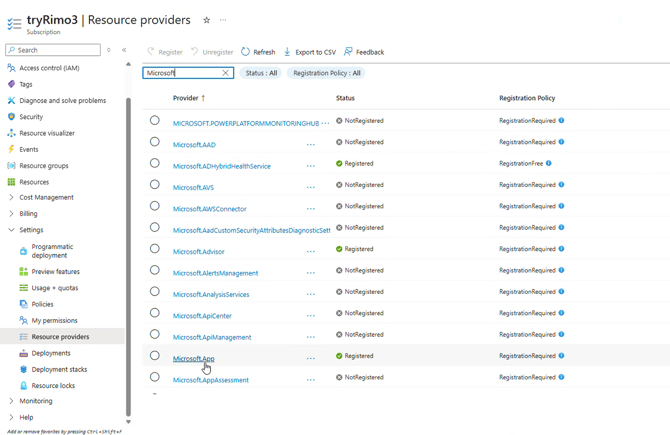
Resources deployed
You will be asked for a Resource Group to contain the Managed Application, and a second Resource Group which will contain the resources themselves, managed by the Managed Application.
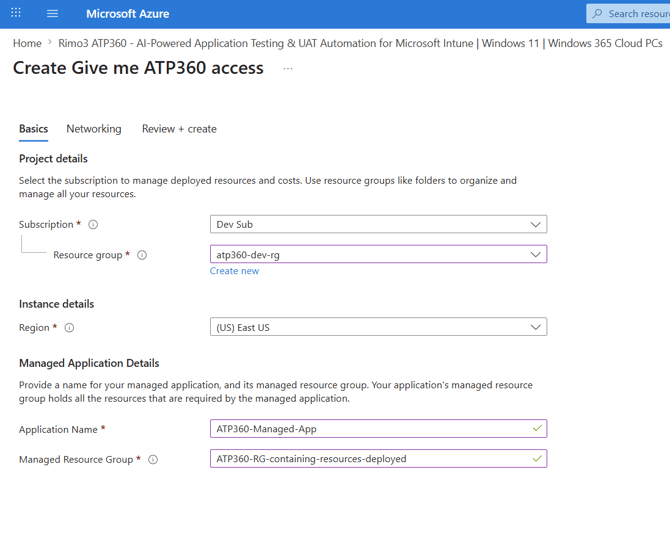
The first Resource Group receives a single resource — the Managed Application. The second Resource Group (named "ATP360-RG-containing-resources-deployed" in the screenshot) receives the following:
|
Name |
Type |
SKU |
Specification |
|---|---|---|---|
|
atp360redis<ID> |
Azure Managed Redis |
Balanced B0 |
vCPUs 2, 0.5 GB cache, non-clustered, no HA |
|
atp360-bootstrap |
Container App |
0.25 vCPU, 0.5 Gi memory |
|
|
atp360backend |
Container App |
2 vCPU, 4 Gi memory |
|
|
atp360frontend |
Container App |
0.25 vCPU, 0.5 Gi memory |
|
|
atp360orchestrator |
Container App |
2 vCPU, 4 Gi memory |
|
|
atp360workflow |
Container App |
2 vCPU, 4 Gi memory |
|
|
atp360workflow-worker |
Container App |
0.5 vCPU, 1 Gi memory |
|
|
atp360-env-<ID> |
Container Apps Environment |
Consumption |
Up to 4 vCPUs / 8 Gi |
|
atp360kv<ID> |
Key Vault |
||
|
atp360-logs-<ID> |
Log Analytics workspace |
||
|
atp360-bootstrap-id-<ID> |
Managed Identity |
||
|
atp360backend-id-<ID> |
Managed Identity |
||
|
pe-atp360kv<ID>-vault.nic.<GUID> |
Network Interface |
||
|
pe-atp360redis<ID>-redis.nic.<GUID> |
Network Interface |
||
|
pe-atp360sql<ID>-sql.nic.<GUID> |
Network Interface |
||
|
pe-atp360st<ID>-blob.nic.<GUID> |
Network Interface |
||
|
pe-atp360st<ID>-file.nic.<GUID> |
Network Interface |
||
|
privatelink.blob.core.windows.net |
Private DNS zone |
||
|
privatelink.database.windows.net |
Private DNS zone |
||
|
privatelink.file.core.windows.net |
Private DNS zone |
||
|
privatelink.redis.azure.net |
Private DNS zone |
||
|
privatelink.vaultcore.azure.net |
Private DNS zone |
||
|
pe-atp360kv<ID>-vault |
Private endpoint |
||
|
pe-atp360redis<ID>-redis |
Private endpoint |
||
|
pe-atp360sql<ID>-sql |
Private endpoint |
||
|
pe-atp360st<ID>-blob |
Private endpoint |
||
|
pe-atp360st<ID>-file |
Private endpoint |
||
|
atp360db |
SQL database |
Basic (5 DTUs) |
2 GB data max size |
|
atp360sql<ID> |
SQL server |
||
|
atp360st<ID> |
Storage account |
Standard |
Storage V2, locally redundant storage |
|
atp360-vnet-<ID> |
Virtual network |
On top of the above list you will also deploy CUA workers, these are covered by the next section.
All data services — Key Vault, Redis, SQL, and Storage — are reached over private endpoints inside a dedicated virtual network, with matching Private DNS zones.
CUA Workers
A CUA worker is a dedicated Windows 11 VM (or physical windows machine), used only for testing, with an outbound path to the Orchestrator on the configured port. The CUA worker should be pre-deployed, pre-configured and dedicated, with no access beyond the applications under test — the agent drives the machine, so the machine should have nothing on it you would not want tested, or want AI to have access to.
5. Communication PathsAt deployment time
At deployment time there is connectivity between Rimo3 and the customer's Azure tenant, as the solution is deployed PaaS-style into the customer's tenant:
- Customer deploys ATP360 from the Azure Marketplace, which initially creates the "atp360-bootstrap" container, a Managed Identity (which issues the bootstrap container's Entra token), and the Azure Key Vault.
- The Bootstrap container calls the Rimo3 publisher API (port 443).
- Secrets to pull the other container images from Rimo3 are obtained.
- Secrets are written to the customer's Key Vault.
- The other container images are pulled from the Marketplace Offering.
- The Bootstrap container checks the channel manifest for updated versions to pull on top of the Marketplace versions.
- Updates are pulled from Rimo3 if they exist.
Secrets flow one way — from Rimo3 to the customer's Azure tenant only. The only cross-tenant call is the bootstrap agent's call to the Publisher API to fetch the secrets needed to pull the other container images. This link is not maintained once the secret has been pulled; the connection is re-established only to check for and pull container image updates.
At run time
Every connection in the solution, its channel, and what flows over it:
|
From |
To |
Channel |
Carries |
|---|---|---|---|
|
User browser |
Frontend container app |
HTTPS |
Console access — authoring, live testing view, results, settings |
|
Frontend |
Backend |
Internal to Container Apps Environment |
Application API calls |
|
Container apps |
Azure SQL |
Managed Identity, private endpoint |
Test results and metadata |
|
Container apps |
Storage Account |
Managed Identity, private endpoint |
Uploaded source documents |
|
Container apps |
Key Vault |
Managed Identity, private endpoint |
AI engine API keys; stored test secrets |
|
Workflow Parser |
Azure Managed Redis |
Internal, private endpoint |
Video parsing queue |
|
CUA Worker (customer tenant) |
Orchestrator |
WebSockets, port 8000 (configurable), outbound from worker |
Registration and heartbeat; step instructions down, screenshots and results up |
|
Bootstrap |
Rimo3 publisher API |
HTTPS, port 443, outbound |
Image-pull secrets at deployment; update checks thereafter |
|
Platform services |
Log Analytics |
Azure diagnostics |
Logging and telemetry |
The direction matters: CUA workers dial out to the Orchestrator. The platform never initiates a connection into the customer environment, and no inbound ports need to be opened. The worker is registered at machine login and identifies itself to the Orchestrator with its assigned URL and API key; newly launched workers can take a few minutes to complete registration.
6. Identity and Secret Management
The posture is consistent across the platform: identity does the authenticating, Key Vault does the storing.
- Managed Identity everywhere. The container apps authenticate to Azure SQL, Key Vault, and the Storage Account with Managed Identity. No connection strings, passwords, or access keys sit in application configuration, and access is scoped per service.
- One vault, two classes of secret. Azure Key Vault holds the API keys used to connect to the AI engines, and the stored credentials used inside tests.
- Write-only secret values. A secret's value is entered once and never displayed again in the console — not to administrators, not in test cases, not in logs.
- Tracked usage. Each secret carries an alias, a type (username, password, API key, token), a target system, and an owner — and the console tracks exactly which test cases reference it, so governance always knows what depends on what.
Managed identity role assignments
The PaaS deployment creates two Managed Identities; this is how access is granted on ATP360. Their assignments are:
Managed Identity: atp360-bootstrap-id-<ID>
|
Role |
Resource |
Reason |
|---|---|---|
|
Owner |
Resources Resource Group |
Deploy resources on Marketplace Offering initial deployment and upgrade infrastructure when needed |
|
Key Vault Secrets Officer |
atp360kv<ID> |
Store secrets related to accessing product updates |
|
Managed Application Operator Role |
Customer-named ATP360 Managed App |
Administer upgrades of resources |
Managed Identity: atp360backend-id-<ID>
|
Role |
Resource |
Reason |
|---|---|---|
|
Key Vault Secrets Officer |
atp360kv<ID> |
Store and retrieve API keys for AI providers, plus customer-entered secrets used within tests |
|
Managed Application Operator Role |
Customer-named ATP360 Managed App |
Use the resources that make up the managed app |
7. Variable-Driven Automated Logins
Web application testing lives or dies on authentication, and this is where the Key Vault integration earns its place. Tests never contain credentials; they contain references.
- Store. A credential is saved as a named secret — alias, type, target system — and the value is written straight to Azure Key Vault.
- Reference. At authoring time, the alias is inserted into test steps as a variable using the console's Insert Vault Secret action. A run can reuse the stored credential or select a different one without touching the test case.
- Resolve. At execution, the platform resolves the alias from Key Vault. The plaintext value is never stored with the test steps.
- Sign in. The CUA worker completes the login on the target web application and the run proceeds autonomously.
This is already how the test library operates. QA_DB_Login (QA staging database) is reused across 3 test cases; ERP_Test_Admin (end-to-end ERP flows) is reused across 14. Rotate a credential once in the vault and every referencing test picks it up on its next run — no test maintenance, no credential sprawl.
8. Governance, Limits and Telemetry
- Human in the loop. Generated test steps are reviewed and confirmed before execution; results are reviewed and confirmed after. Critical decisions stay with your team. During execution, kill-switch controls allow a test to be stopped, and (coming soon) tests can be steered interactively in real time through direct keyboard and mouse control or a chat interface. Users can review and override completed test results where the AI got the outcome wrong.
- Hard execution limits. Per-run ceilings on cost (USD), token usage, and the number of actions stop any runaway automated loop before it matters. Parser output is similarly capped by a maximum number of test steps per case.
- Access control. Coming soon, RBAC capabilities allow custom roles and role assignments to be created within ATP360 and granted as the customer sees fit — extending to governance over who can access which AI engines and models, who can use AI to run tests, and who can use AI to modify or generate tests.
- Telemetry by consent. Coming soon, Telemetry is opt-in and tiered (basic efficacy metrics, or advanced diagnostics), and 100% anonymous — no PII, no sensitive user data, and no proprietary test contents are ever collected.
- Auditable operations. The system error log is retained for up to 30 days and exportable to CSV, and platform and container versions are visible at all times. Coming soon, when using Windows 365 for Agents, AI calls and tool calls are made in the context of an agentic ID and fully audited for transparency and clear governance.
9. Evidence from Executed Test Runs
The following web application test cases have been built and run on the platform. Each step is recorded with an expected outcome and an actual pass/fail result, and every run is reviewed by a human before results are accepted.
|
Test case |
Category |
Steps validated |
|---|---|---|
|
Admin Login Verification |
Authentication / Security |
Navigate to the admin portal login URL (login screen displayed); enter valid admin credentials — vault-resolved — and sign in; user authenticated and redirected to the dashboard |
|
Checkout Flow Regression |
E-Commerce |
Add two items to the cart (icon updates); proceed to checkout and enter billing details (validation passes to payment); submit test payment (order confirmation with order ID) |
|
User Profile Update |
User Settings |
Navigate to user settings (profile form accessible); upload a new profile picture (.png); image preview updates immediately |
The login test is worth pausing on: it is a real autonomous authentication against a web application, with the credential resolved from Azure Key Vault at run time — the exact pattern we would reuse against your applications in a pilot.
Proposed next steps
- Security architecture Q&A — walk your team through the communication paths and identity model in this brief.
- Confirm the deployment prerequisites in Section 4 (resource providers registered, Owner role on the target subscription) and deploy the Managed Application from the Azure Marketplace.
- Select two or three of your web applications and load their test credentials into Key Vault as stored secrets.
- Stand up a dedicated CUA worker in your tenant — outbound connection only.
- Pilot run: reuse the existing login, checkout, and profile test patterns against your applications, with results reviewed by your team.
Rimo3 · Automation. Simplified.
Frequently Asked Questions
What type of AI system does ATP360 use?
ATP360 uses generative AI and computer vision.
What is the source of the AI system?
ATP360 integrates with leading public large language models: Google Gemini, OpenAI's GPT models, and Anthropic's Claude Opus and Sonnet models.
Who hosts the AI system?
ATP360 is a PaaS solution hosted in Azure within the customer's own Azure tenant. A SaaS edition, hosted by Rimo3 in Azure, is coming soon.
What are the hardware and software requirements for deploying and running ATP360?
ATP360 is Azure hosted. See the product documentation for detailed specifications.
Is customer data used to train AI models?
No. ATP360 does not collect training data, and no customer data is used to train AI models.
How is AI-generated output validated to prevent harmful or incorrect results?
Every generated test case can be reviewed by a person before it is executed. During execution, kill-switch controls allow a test to be stopped immediately, and the ability to interactively steer a test in real time — through direct keyboard and mouse control or a chat interface — is coming soon. Users can also review and override completed test results where the AI reached the wrong outcome.
How is input data to the AI models validated and sanitised?
Inputs to the AI engines are limited to the documents, screen recordings, and prompts that customers provide for test generation. No additional sanitisation is applied at this stage.
How is access to AI components controlled?
Access to the AI engines is controlled via API keys. Coming soon, RBAC capabilities will allow custom roles and role assignments to be created within ATP360 and granted as the customer sees fit — including governance over who can access which AI engines and models, who can use AI to run tests, and who can use AI to modify or generate tests.
How is the behaviour of the AI models monitored?
As ATP360 is a PaaS solution, monitoring runs within the customer's environment rather than centrally. Coming soon, when using Windows 365 for Agents, all AI and tool calls are made in the context of an agentic ID and are fully audited for transparency and clear governance.
How are updates and patches to the AI models handled?
Product updates are deployed automatically when made available; customers can switch off auto-updates and deploy them manually from the UI instead. ATP360 uses public LLMs, so updates to the underlying models are managed by their providers.
How are the AI models secured against adversarial attacks and reverse engineering?
ATP360 contains no proprietary AI algorithms; it uses public LLMs, so model security is managed by the model providers.
Does ATP360 integrate with other systems?
ATP360 is currently a standalone module with no native integrations with other aspects of WorkspaceDNA. Access to the public LLMs is controlled via API key and, coming soon, governed by RBAC.
How are end users educated about the capabilities and limitations of the AI?
Full product documentation, including how-to videos, is publicly available on the Rimo3 website.